

Best Fiber Optic HDMI Cable for Long-Distance 4K and 8K Video
2026-11-16
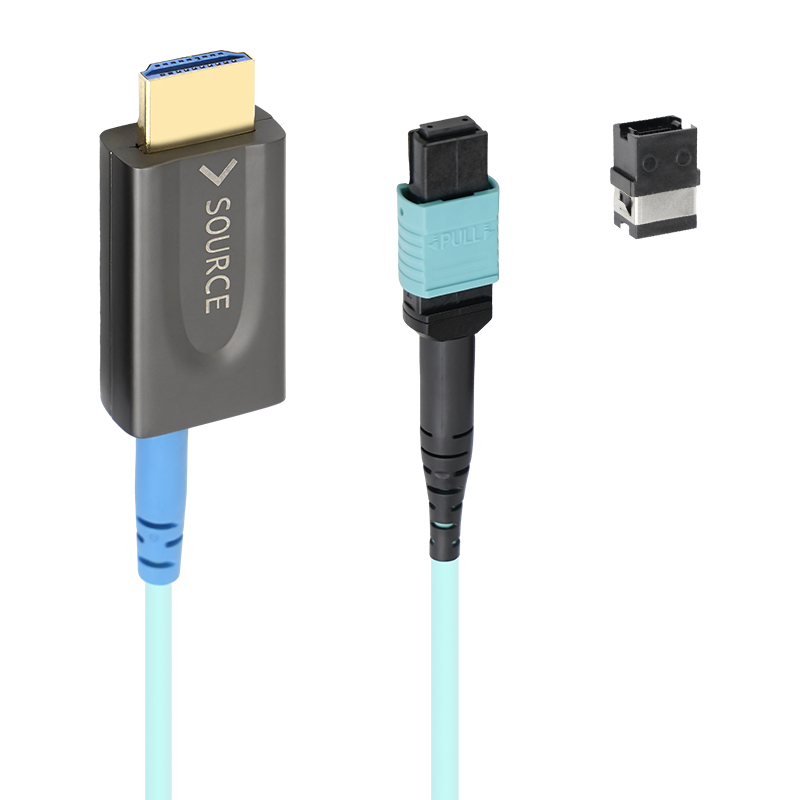
Long cable runs and 4K or 8K video have a reputation for hating each other. Copper HDMI cables start waving the white flag around 25 feet, leaving you with flickers, sparkles, or no signal at all. That's why a fiber optic HDMI cable isn't just a luxury—it's the only sane way to move high-bandwidth video across a room. Among the options I've tested, EBCYX stands out for reasons that go beyond the spec sheet. Here's what makes it my pick for the best long-distance 4K and 8K video cable.
Why Copper HDMI Can't Keep Up with 8K Over Long Runs
Copper HDMI cables work fine for short jumps between a media player and a nearby display, but the story changes once you stretch them past a few meters. The core issue is attenuation: electrical resistance in copper turns high-frequency signal energy into heat. An 8K signal at 48 Gbps pushes frequencies well beyond what typical HDMI 2.0 cables ever had to carry, and the loss climbs sharply with distance. By the time you hit 15 or 20 feet, the receiver can no longer reliably tell a one from a zero, resulting in sparkles, dropouts, or no image at all.
Another factor is inter-symbol interference. As the signal degrades, the sharp rising and falling edges of each bit start to smear into neighboring bits. Copper's inherent capacitance and inductance worsen this effect at higher data rates, especially with the tighter timing margins required by 8K resolution. Manufacturers can use thicker conductors or better shielding, but those make the cable heavier, stiffer, and more expensive. Even then, practical limits remain because physics doesn't bend to marketing claims.
For long runs, installers often switch to fiber optic HDMI or hybrid solutions that convert electrical signals to light, which suffers almost no loss over tens of meters. Active copper cables with built-in equalizers can help in mid-range setups, but they introduce their own power and compatibility quirks. If you need 8K across a room or through a wall, relying on passive copper alone is a gamble that usually ends with a black screen.
The Real Bandwidth Needs for 4K and 8K Video
Most streaming platforms throw around numbers like 15–25 Mbps for 4K, but those figures assume aggressive compression that trades away fine detail in dark scenes or fast motion. If you actually want to preserve the grain structure and shadow nuance of a high-end camera original, a 4K HDR feed at 60 frames per second can demand 100 Mbps or more. The moment you jump to 8K, the pixel count quadruples, yet the bandwidth requirement doesn't simply multiply by four—it scales with the square of the resolution only if you keep the same codec and quality target. In practice, modern encoders like AV1 or VVC manage to cut the bitrate roughly in half compared to older HEVC, but a visually lossless 8K stream still hovers around 200–400 Mbps, far beyond what typical home connections deliver.
What's often overlooked is the distinction between average bitrate and peak bitrate. A movie scene with a slow pan over a static landscape might average 30 Mbps in 4K, but a confetti explosion or heavy film grain can spike to three or four times that for a fraction of a second. If the network can't handle those bursts, viewers see blocking or stutter even though the average number looks fine. For 8K, these peaks become brutal: a single frame of complex texture can exceed 800 Mbps on an intra-coded reference picture. That's why broadcasters and streaming services rely on capped variable bitrate encoding—but the cap itself becomes a quality ceiling, forcing compromises that often negate the resolution advantage.
On the delivery side, the real bottleneck isn't the final mile but the backbone aggregation. A single 8K live event doesn't just need one 300 Mbps stream; it needs multiple versions for adaptive bitrate ladders, low-latency protocols, and regional edge caches. A production truck sending an 8K feed back to the studio might require a dedicated 10 Gbps fiber link once you add camera feeds, monitoring, and redundancy. For consumers, the honest answer is that true 4K and 8K quality demands far more than the marketing numbers suggest—and until compression improves by another order of magnitude, physical media or high-bitrate downloads will remain the only way to see what those pixels can actually do.
Fiber Optic vs Hybrid HDMI Cables Explained
Pure fiber optic HDMI cables move the entire signal as light, so interference from nearby power lines or other electronics doesn't affect them the way it does with copper. This advantage becomes hard to ignore once runs stretch past 30 feet. Copper-based HDMI at that distance often starts flickering or losing the handshake, while fiber just keeps the picture stable. Plus, the cables stay much thinner because they skip the heavy shielding and thicker wire gauge copper needs.
Hybrid HDMI cables mix both worlds. The high-bandwidth video and audio travel over fiber strands, but the low-speed control signals (like CEC, EDID, and hot-plug detection) still ride on copper wires. That design keeps the connector compatible with standard HDMI ports and allows the cable to be powered from the source without an external adapter. The copper portion does create a small opening for electrical noise, though in most home setups it's not enough to cause visible problems.
Where you put the cable matters more than the spec sheet. Long in-wall or conduit runs of 50 feet or more tend to favor pure fiber optic HDMI, especially if the cable will share space with electrical lines. Hybrid makes more sense for shorter to medium distances where you want a thinner, lighter cable and don't want to deal with a separate power supply. It also tends to handle tight bends behind a wall-mounted display better than a pure fiber cable.
How Fiber HDMI Cables Eliminate Signal Loss Past 100 Feet
The core problem with copper HDMI over long distances is electrical resistance. When a 4K or 8K signal travels through thin copper conductors, attenuation creeps in gradually, bit errors multiply, and the display eventually drops out or flickers. Fiber optic HDMI cables replace those copper wires with glass strands that carry light instead of electrical current, so resistance is effectively removed from the equation. That single change lets a signal hold its integrity far beyond the point where a typical copper cable starts to fall apart.
Copper also has to fight capacitance and the skin effect. High-frequency data tends to crowd toward the outer surface of a conductor, which increases effective resistance and softens the sharp digital transitions that the receiver needs to read cleanly. A fiber cable doesn't face that issue, because light pulses stay crisp whether they are traveling six feet or one hundred and fifty feet. Installers often notice the difference most clearly in the field, where a fiber run will lock onto a signal instantly at lengths that would make a premium copper cable struggle with handshakes or refuse to sync at all.
Long copper cables can also behave like antennas, picking up electromagnetic interference from nearby power lines, lighting systems, or other equipment. Once that noise enters the cable, the HDMI receiver has to work much harder to recover a clean image, and beyond a certain point it simply cannot. Fiber is immune to electromagnetic interference, so the optical signal that gets launched is essentially the signal that arrives. In large rooms, conference halls, or installations where cables run through walls and conduit next to electrical wiring, that immunity is often what separates a stable, reliable picture from constant dropouts and retraining loops.
Running Fiber HDMI Through Walls and Conduits Like a Pro
Pulling fiber HDMI through finished walls demands more patience than muscle. Start by mapping the exact path between your source and display, then cut access holes only where you can hide them behind baseboards, crown molding, or wall plates. When you hit a fire block or stud, switch to a flexible drill bit with an installer bit extension and work slowly—fiber optic cable kinks far more easily than copper, and a sharp bend can ruin the signal permanently. Feed the cable through a conduit or smurf tube whenever possible, leaving a pull string behind for future upgrades.
Conduit runs are the real secret to a clean install. Use at least 1-inch inner diameter for fiber HDMI with factory-terminated connectors, because those heads can be nearly as wide as a golf ball. Lubricate the cable lightly with cable pulling lubricant, not soap, and have a partner gently push while you pull from the other end. Avoid 90-degree elbow fittings; use sweep bends instead. If the run is longer than 30 feet, add a junction box with a service loop so you can replace a damaged cable without tearing open the wall again.
Finally, test the entire link before closing up any drywall. Plug both ends into a known-working source and display, and run a 4K HDR test pattern for at least ten minutes—fiber HDMI is fragile, and even a tiny pinch inside the wall can cause sparkles or dropouts. Leave a generous service loop at each end, and label the cable both behind the wall plate and near the equipment rack. A little extra care during the pull saves you from a frustrating afternoon of troubleshooting later.
Long-Distance 4K and 8K Setups That Demand Fiber Optic HDMI
Copper HDMI cables start throwing signal errors once you push past 25 or 30 feet at high resolutions. A 4K 60Hz feed with HDR needs roughly 18Gbps of bandwidth, and 8K jumps to 48Gbps. Over long runs, that data stream degrades into sparkles, dropouts, or a blank screen. Fiber optic HDMI replaces the copper conductors with glass or plastic fiber, sending light pulses instead of electrical signals. That switch removes the distance penalty almost entirely, letting you run 50, 100, or even 300 feet without signal loss or added latency.
The most common scenarios involve ceiling-mounted projectors in home theaters, video walls in retail spaces, or conference room displays linked to a distant equipment rack. In these setups, a hybrid fiber cable with copper for power and control plus fiber for video is the practical choice. You get the same crisp 4K and 8K output as a short premium cable, but without the bulky repeaters or active boosters that often fail mid-event. Installation is also less nerve-wracking: the fiber core is immune to electromagnetic interference from power lines or stage lighting, so you can route it through plenum spaces or alongside electrical conduit without worrying about picture quality.
If you are planning a permanent install where pulling new cable would be a nightmare, fiber optic HDMI is worth the upfront cost. True, it is pricier than copper, and the connectors are directional, so you need to mark source and display ends clearly. But once it is in place, you can forget about resolution limits or handshake issues. For any long-distance 4K or 8K signal chain, fiber is not a luxury; it is the only reliable way to keep the image intact from source to screen.
FAQ
Copper HDMI signals degrade quickly over distance, especially with 4K or 8K bandwidth demands. Fiber converts electrical signals to light, so attenuation stays nearly flat across 50, 75, or even 100 feet. You get clean video without snow, sparkles, or handshake failures that are common with long copper runs.
Yes, as long as the cable is certified for Ultra High Speed HDMI (48Gbps). Fiber optic construction handles the full 48Gbps bandwidth over long distances, so 4K 120Hz with HDR, VRR, and ALLM works reliably. Just make sure your source and display support the same HDMI 2.1 features.
No, because both carry digital signals. The image is identical when the signal arrives intact. Fiber simply preserves the signal over longer distances where copper would introduce errors. Over a 6-foot run, you won't see a difference; over 40 feet, fiber is the only one that works reliably for 8K.
Most active fiber HDMI cables draw power from the HDMI port itself, so no separate power adapter is needed. Some very long models may include a USB power option for stability, but that's rare. Setup is plug-and-play; just connect the source and display and the internal electronics wake up automatically.
Check for the official Ultra High Speed HDMI certification label, which guarantees 48Gbps over the cable's full length. Also confirm that your receiver and TV both support HDMI 2.1. Finally, look for user feedback specific to your TV brand—some early 8K sets had handshake quirks with certain fiber cables.
Yes, fiber HDMI cables are active and directional. One connector is labeled source or display, and reversing them will result in no signal or a black screen. The electronics inside are designed to send light in one direction only, so always check the labels before running the cable through walls.
Fiber is more sensitive to sharp bends than copper, but good quality cables use bend-insensitive fiber and reinforced jackets. Avoid folding the cable at a 90-degree angle or pulling it hard through narrow conduit. A gentle curve with a radius of a few inches is fine for most installations.
Look for a CL2 or CL3 rated jacket to meet fire safety codes. Ensure the connector heads are slim enough to fit through your conduit or wall plate openings. Decide on the exact length you need with a little slack, because fiber cables cannot be easily extended or patched. Also verify the directional labeling is printed clearly on both ends.
Conclusion
Modern 4K and 8K video signals demand far more bandwidth than traditional copper HDMI cables can reliably deliver over distance. Once you push past roughly 25 feet for 8K or 50 feet for 4K, copper begins to struggle with attenuation, electromagnetic interference, and clock jitter. This is why fiber optic HDMI cables have become essential for long-haul AV installations. Unlike copper, fiber uses light to transmit data, so it doesn't suffer from the same resistance losses and can carry 48 Gbps signals several hundred feet without degradation. Hybrid cables combine fiber for the high-speed data lanes with copper for lower-speed control channels like CEC and EDID, giving you a practical all-in-one solution for projectors, video walls, or conference room displays.
Fiber optic HDMI cables truly shine in scenarios where you need to run cable through walls, conduits, or plenum spaces. Because the optical core is immune to electrical noise, you can bundle it alongside power lines without worrying about interference. Many installers prefer bend-insensitive fiber cables with detachable HDMI connectors, which simplify pulling through tight conduits. For dedicated home theaters, commercial digital signage, or long-distance gaming setups, a pure fiber or active hybrid cable eliminates the signal dropouts and sparkles that plague copper past 100 feet. The key is matching the cable's certified bandwidth to your content: look for Ultra High Speed HDMI certification for 8K/60 or 4K/120, and choose a cable with a reinforced jacket if it will be pulled through walls. With the right fiber optic HDMI cable, you can place your source device in a rack closet while keeping the display across the room, with zero perceptible latency or quality loss.
Contact Us
Contact Person: David Yang
Email: [email protected]
Tel/WhatsApp: 8615814734054
Website: https://www.ebcyx.com/