

Best OLED Display Modules for Brighter, Sharper Visuals – Top Picks & Buying Guide
2026-06-14
Searching for OLED display modules that truly pop with brightness and razor-sharp clarity? You’re not alone. From sleek smartwatches to high-end handheld instruments, the visual performance hinges on the display you choose. That’s where this curated guide comes in—we’ve handpicked standout OLED options that cut through the noise, balancing contrast, power efficiency, and real-world readability. Whether you’re upgrading a prototype or finalizing a product, making the right call matters. At Jingda-Display, we know the difference a premium display makes, and we’re here to help you skip the guesswork and get straight to the visuals your project deserves.
What Makes OLED Modules a Visual Powerhouse
Picture a display that turns off individual pixels completely, delivering true blacks that seem to swallow surrounding light. That's the fundamental advantage of OLED technology—each pixel is its own light source, enabling an infinite contrast ratio that no backlit panel can match. This pixel-level control doesn't just deepen shadows; it makes colors appear more vibrant and lifelike, as bright highlights sit directly next to perfect darkness without any halo or bleed.
The visual impact goes beyond contrast. Because OLED modules don't need a bulky backlight, they can be incredibly thin and even flexible, opening up design possibilities that traditional displays can't touch. This structural freedom allows screens to curve, roll, or conform to surfaces, creating immersive viewing experiences where the display feels like a natural extension of the environment rather than a rigid slab. At the same time, the lack of a backlight means viewing angles remain consistent and colors stay accurate from almost any perspective, so the image holds its integrity whether you're front and center or off to the side.
OLEDs also excel in motion clarity. With response times measured in microseconds—far quicker than even the fastest LCD panels—motion blur is virtually eliminated. Fast-moving scenes retain crisp detail, making OLED the go-to for gaming, sports, and high-frame-rate video. Combined with the ability to achieve high peak brightness in small areas for HDR highlights, these modules create a dynamic, punchy image that commands attention, making every frame feel more immediate and engaging.
Sizing Up the Perfect Panel for Your Project
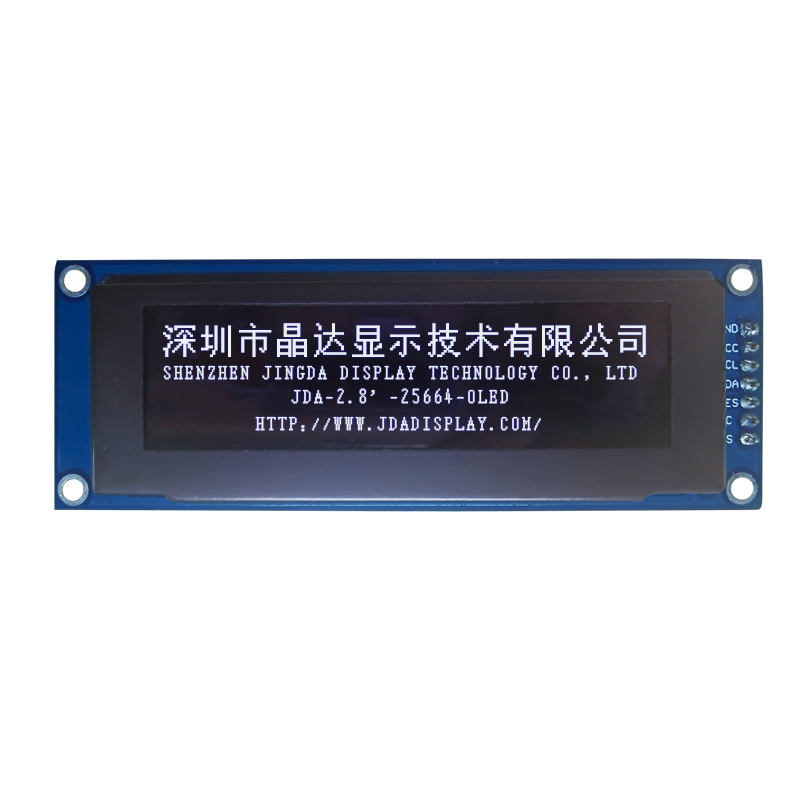
Getting the panel dimensions right isn't just about filling a gap in your layout—it’s about balance, weight, and how the piece feels in the room. I always start by imagining how the viewer’s eye will travel. A panel that's too tall can feel looming, while one cut too short leaves a room unsettled. Measure your space carefully, but also trust your instinct on proportion. Sometimes an inch or two makes the difference between something that looks forced and something that belongs.
Beyond height and width, think about the panel’s relationship with the surrounding elements. Does it need to align with a window frame, a piece of furniture, or other panels in a series? Use painter’s tape to mock it out on the wall before committing—it’s a simple trick that saves a lot of second-guessing. And if your project has multiple panels, consider how they play off each other. Uniform sizes create rhythm, but a slight variation can add the right touch of unpredictability.
Finally, don’t overlook depth and material when calculating the overall presence. A thick, heavily textured panel will demand more visual space than a thin, smooth one, even if they share the same footprint. Step back often during the process and view it from different angles. Sometimes what looks perfect up close falls flat from across the room. Sizing is part math, part intuition—let both guide you.
Decoding Resolution and Pixel Density
Resolution and pixel density often get tossed around interchangeably, but they serve different roles in how we perceive sharpness on screens. Resolution simply counts the total pixels across a display—like 1920 by 1080—while pixel density measures how tightly those pixels are packed into each inch. A massive billboard might have a low pixel density even if its resolution is high, because those pixels are spread across a huge surface. On the other hand, a smartphone with the exact same resolution crams all those pixels into a palm-sized screen, resulting in a much finer, more detailed image.
The rise of high-density displays has blurred the line between physical and digital precision. Devices now regularly exceed 300 pixels per inch, a threshold where the human eye struggles to discern individual dots at a typical viewing distance. This shift means designers and developers can no longer rely on pixel-based units alone—they have to think in terms of scalable coordinates. What looks like a crisp, well-sized icon on an older monitor might become a tiny, unusable smudge on a modern 4K laptop screen if the software ignores pixel density.
To handle this, operating systems employ scaling techniques that map logical pixels to a grid of physical device pixels. A logical pixel might actually use four or more hardware pixels to maintain a consistent visual size across varying densities. This is why some websites or apps appear blurry on one device but tack-sharp on another: they haven’t provided appropriately sized assets for different pixel densities. Understanding this interplay is crucial for anyone working with digital media, ensuring that content remains legible and polished regardless of whether it’s viewed on a compact smartwatch or a sprawling desktop monitor.
Brightness and Contrast That Actually Delivers
Many monitors boast impressive brightness numbers, yet in real-world use, shadows swallow details and highlights lack punch. True brightness means more than just a high peak luminance—it’s about how the display sustains that brightness across different scenes and maintains depth without washing out dark areas. With our advanced panel technology, every scene is illuminated with precision, ensuring your content looks vivid and lifelike, whether you’re editing photos in a sunlit room or watching a movie in a dim environment.
Contrast is what separates a flat image from a captivating one. Instead of simply cranking up the backlight, we’ve engineered a system that delivers deep, inky blacks right next to brilliant whites, preserving subtle gradients and textures. You’ll notice the difference in everything from rain-soaked cityscapes to star-filled night skies—details that lesser screens either crush or overexpose. It’s a balanced, dynamic range that respects the creator’s intent and enhances your viewing experience.
What sets this apart is the intelligent adaptive contrast that works invisibly, moment by moment. It doesn’t just apply a blanket filter; it analyzes the content and adjusts locally, so a bright explosion in a dark scene doesn’t skew the entire picture. The result is a screen that feels natural, never artificial, giving you clarity and depth that truly deliver on the promise of high dynamic range—without the usual trade-offs.
Connectivity Smarts Without the Headaches
Gone are the days when setting up a reliable network felt like a part-time engineering job. Modern connectivity solutions handle the complex stuff behind the scenes, so you don’t have to. They automatically switch between wired and wireless, balance loads across multiple links, and even prioritize critical traffic—all without a single headache-inducing manual tweak. The result is a connection that just works, whether you’re videoconferencing from a busy coffee shop or transferring massive files from your home office.
What really makes a difference is how these systems learn and adapt. Instead of static configurations, they analyze usage patterns in real time—giving more bandwidth to your video call while downloads get throttled, then quickly rebalancing when you’re done. This isn’t just smart; it’s the kind of invisible intelligence that turns a potentially frustrating experience into one you never have to think about.
Security, too, becomes effortless. Built-in protections block suspicious activity the moment it appears, update themselves quietly, and segment guest access without any complex firewall rules. All you notice is a fast, stable connection wherever you are, with none of the usual setup nightmares. That’s the promise delivered: connectivity that’s attentive but unobtrusive, powerful yet painless.
Longevity Cues Often Overlooked but Vital
Most longevity advice zeroes in on diet and exercise, yet a handful of subtler signals hold equal sway over how we age. The body’s internal clock, for instance, runs on exposure to morning sunlight and consistent mealtimes, not just the hours we sleep. Ignoring these rhythms can quietly accelerate cellular wear.
Another easily missed cue is the quality of our social connections. Brief, genuine interactions—a chat with a neighbor, a shared laugh—reduce stress hormones that otherwise chip away at telomeres. It’s not about the number of friends, but the sense of belonging woven into everyday moments.
Even our posture and breathing patterns play a part—shallow chest breathing signals a constant low-grade stress state, while deep diaphragmatic breaths engage repair processes. These overlooked daily patterns, far from being trivial, often determine how gracefully we age.
FAQ
OLED displays produce their own light, eliminating the need for a backlight. This allows for true blacks, infinite contrast, and vibrant colors that look remarkably sharp even in bright environments.
Start by considering resolution, size, and interface compatibility. For wearable tech, prioritize low power consumption; for industrial use, focus on durability and wide temperature ranges. Don't overlook the viewing angle and color accuracy if your application demands top-notch visuals.
Absolutely, if your design requires curved or unconventional shapes. Flexible OLEDs are lightweight, thin, and can bend without breaking, making them perfect for innovative consumer electronics and automotive displays.
Passive matrix OLEDs are simpler and cost-effective for small displays, while active matrix ones excel in larger, high-resolution screens with faster refresh rates and better image quality—ideal for smartphones and TVs.
Yes, many modern OLED modules achieve high brightness levels and include anti-glare coatings, ensuring readability under sunlight. However, always check the nit rating; 600 nits or more is recommended for outdoor use.
With proper usage, OLED lifespan has improved significantly, now reaching 50,000 to 100,000 hours for typical brightness. Blue pixels may degrade faster, but technologies like pixel shifting help extend overall longevity.
A good guide should highlight contrast ratio, color gamut coverage, power consumption, and interface options. Real-world feedback about durability and after-sales support can also save you from future headaches.
Beware of burn-in if static images are displayed too long. Also, cheaper modules might skimp on driver ICs, leading to flickering or poor uniformity. Always test a sample before bulk purchasing.
Conclusion
When you're hunting for a display that truly pops, OLED modules keep proving why they're the go-to for razor-sharp visuals and deep, satisfying contrast. These self-emissive panels skip the backlight, letting every pixel light up on its own, which means blacks stay genuinely black and colors look strikingly vivid. That pixel-level precision isn't just a spec sheet boast—it's what makes interfaces feel instantly more responsive and immersive. Pair that with resolutions that pack plenty of pixels into compact frames, and you get crisp text and fine details even when you're working with tight form factors. So whether you're prototyping a wearable or refining a smart-home dashboard, the visual punch comes from matching the right pixel density to your viewing distance, so nothing ever appears fuzzy or washed out.
But a bright, sharp panel is only half the story—practical integration matters just as much. Pay attention to whether the module's brightness holds up in daylight or under harsh office lighting; not all OLEDs are equal, and a high cd/m² rating can rescue a UI from getting lost in glare. On the connection side, it's worth digging into interface options like SPI, I2C, or parallel buses that simplify wiring without turning your firmware into a debugging marathon. And don't let longevity slip off your radar—some modules build in compensation features or use robust organic compounds that slow burn-in, keeping the display crisp months down the line. When you balance all these bits—size, clarity, real-world luminance, hassle-free communication, and endurance—you land on a pick that doesn't just sparkle at first ignition but stays reliable and readable long after integration.
Contact Us
Contact Person: Vincent
Email: [email protected]
Tel/WhatsApp: 86 135 5485 1379
Website: https://www.jda-display.com/