
Enterprise Drone Simulator Supplier for Realistic UAV Training Solutions
2026-08-13
When your enterprise relies on drones for critical missions, training can't afford to feel like a game. That's why finding the right enterprise drone simulator supplier for realistic UAV training solutions matters more than ever. SRIZFLY is built for teams that need to practice like they fly—with physics, environments, and failure scenarios that mirror real operations. In this post, we explore how SRIZFLY's simulators turn risk-free practice into mission-ready confidence.
Rotor Wash, Battery Sag, and Wind Gusts: The Physics Behind Credible UAV Training
Rotor wash is often treated as a simple downward column of air, but near surfaces it loops back and creates a cushion of dirty air that can throw a drone off balance during landing. When training simulators ignore the way that recirculating airflow interacts with walls, ceilings, or the ground, pilots develop false confidence and then discover the hard way that a real aircraft drops a wing while descending into its own wake. Good physics models capture this unsteady ground effect and vortex ring behavior, so trainees learn to manage throttle and descent rate before they ever pick up a controller.
Battery sag is another piece that separates credible training from superficial simulation. A pack that reads 14.8 volts on the bench can dip below 12 volts under a full-throttle climb, and that drop eats into available thrust precisely when you need it most. Temperature, age, and charge state all influence internal resistance, so a good UAV training tool must model voltage depression and recovery in real time. If the battery meter is just a timer that counts down, students never experience the sluggish climb or unexpected sink that warns an experienced pilot to back off the sticks.
Wind gusts are rarely steady, yet many training programs bake in a constant vector and call it wind. Actual gusts arrive as quick pulses or rolling turbulence, slapping the airframe sideways or forcing the flight controller to make rapid corrections that lag behind the disturbance. Credible UAV training adds spectral variation—short spikes, lulls, and direction shifts—so pilots learn to anticipate rotor wash from buildings, ground thermals, and sudden downbursts. That kind of physical fidelity is what turns a simple stick exercise into instinct.
Mix Multirotor and Fixed-Wing Fleets in One Simulator Without Compromising Flight Profiles
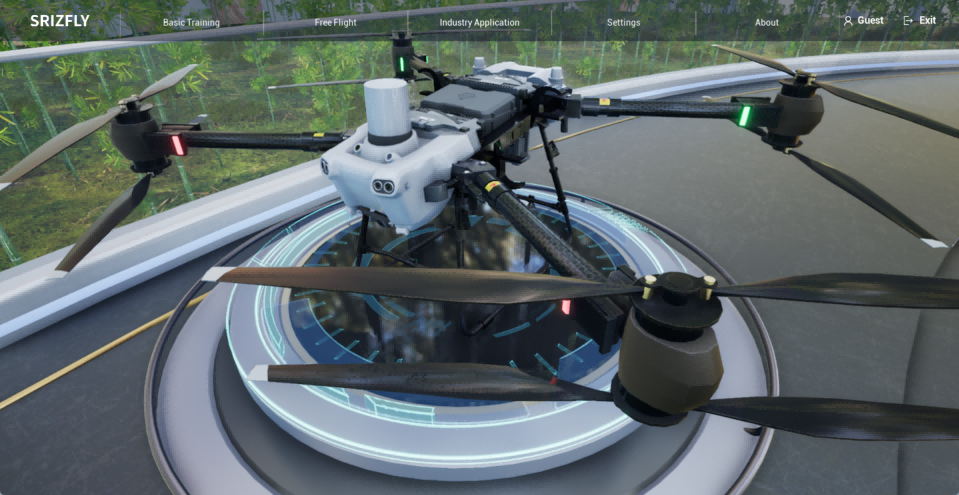
Running both multirotor and fixed-wing aircraft in the same simulation environment used to mean accepting a lowest-common-denominator flight model. Quads would drift like planes on approach, or fixed-wings would lose their stall and glide characteristics to fit a hover-centric physics engine. The result was a fleet simulation that felt detached from real-world behavior, forcing teams to maintain separate tools for each airframe type.
This simulator takes a different route. Each vehicle keeps its native aerodynamic profile, from rotor wash and thrust vectoring on a hexacopter to the lift, drag, and control-surface responses of a fixed-wing airframe. Switching between a hovering inspection drone and a long-range mapping plane happens within the same scenario, with no need to rebuild the environment or translate waypoints between formats. The physics solver respects the distinct constraints of each platform, so a multirotor's abrupt yaw authority doesn't leak into fixed-wing coordinated turns, and a plane's energy management during descent isn't overwritten by VTOL assumptions.
For mixed-fleet operations—think urban air mobility trials, hybrid delivery routes, or coordinated search-and-rescue patterns—this means you can evaluate how a quadcopter loiters beside a circling fixed-wing without artificially flattening their performance envelopes. Battery draw, wind response, and sensor gimbal stability all follow platform-specific models, giving engineers a single testing ground that doesn't ask them to compromise on flight fidelity.
Rehearse Powerline Inspections, SAR Missions, and Tactical Response in Pre-Built Environments
Running a powerline inspection rehearsal usually means coordinating aircraft, ground crews, and a long list of safety checks before anyone leaves the briefing room. With pre-built environments, that whole setup collapses into a few minutes. You load a corridor that mimics the actual terrain, weather, and tower spacing, then work through approach angles, sensor payload settings, and crew communication without risking equipment or burning flight hours.
The same logic applies to search and rescue. Instead of improvising a missing-person scenario on the fly, teams can drop into a mountain drainage, a flooded neighborhood, or a dense woodland already populated with realistic landmarks, vegetation, and variable visibility. That lets the focus stay on search patterns, radio discipline, and decision points rather than fumbling with map layers or waiting for a safety brief.
Tactical response drills benefit from the same groundwork. Pre-built urban and rural layouts give officers or military units repeatable spaces to run room entries, vehicle interdictions, or perimeter setups. Because the environment is fixed but adjustable, instructors can compare one team's choices against another and walk through mistakes without starting from an empty grid each time.
How Teams Train Emergency Procedures Without Grounding a Single Real Aircraft
Full-motion flight simulators have become the backbone of emergency training. A crew can push an engine fire, lose a hydraulic system, and still land safely in the span of an afternoon—all inside a box that never leaves the ground. The visuals and motion cues are convincing enough to trigger real adrenaline, which is exactly what instructors want when practicing engine failures, smoke in the cockpit, or rapid decompression.
Cabin and maintenance teams use their own high-fidelity mockups. Flight attendants run evacuations in smoke-filled cabin trainers where exit doors jam and slide deployment has to be done by feel. Mechanics work through virtual fault isolation on touchscreen panels before touching an actual jet. Because every scenario can be repeated or paused, mistakes become teaching moments instead of costly incidents.
Recently, VR and AR have added another layer. Crews can walk through an unfamiliar aircraft layout or rehearse a water landing while standing in a training room. The result is that no revenue aircraft gets pulled from the schedule, no fuel is spent, and no passenger is ever placed in a training drill. The airline keeps flying, and the teams stay ready.
Custom Scenario Builder for Enterprise Drone Programs with Unique Operational Limits
Most drone scenario tools force you into a rigid template that assumes every flight follows the same basic rules. But enterprise operations rarely work that way. A utility company inspecting power lines in high winds has wildly different constraints than a film crew chasing a tracking shot over a crowded set. Our builder lets you define those limits directly—altitude ceilings, no-fly corridors, battery reserve thresholds, even signal interference zones—so the scenario you train against mirrors the environment your pilots actually face each morning.
The real value surfaces when you stack multiple operational limits into a single run. Suppose your team needs to survey a rail corridor after a storm: you can program a temporary ceiling drop near live wires, add a lateral buffer around a moving maintenance crew, and require a return-to-home point that shifts with the last known telemetry. Instead of juggling three separate simulation modules, you build one fluid sequence that forces the pilot to prioritize, adapt, and make call-outs under pressure.
We built the interface around plain-language rules rather than dropdown presets. If your airspace authorization includes a dynamic exclusion zone that changes on weekdays, you type that logic once and reuse it. No code, no scripting, just a list of constraints your team already understands. That means someone from safety, not engineering, can tweak the scenario between shifts—and the next morning's training feels less like a generic demo and more like a dress rehearsal for a mission with real consequences.
Multi-User Simulation Sessions That Link Pilots, Observers, and Command Centers
Inside a multi-user simulation, the cockpit is no longer an isolated bubble. A pilot wrestling with a sudden hydraulic failure hears the observer's calm readout of system status, while a command center operator simultaneously pulls up the same live telemetry and annotates a safe divert field on the shared tactical map. The session binds these roles together through synchronized data streams, voice loops, and role-specific overlays, so every decision arrives already cross-checked by three distinct perspectives.
What makes these linked sessions feel less like a scripted exercise is the way control shifts fluidly. Observers can inject weather cells or traffic conflicts that the pilot only glimpses as raw radar returns, forcing the command center to negotiate new spacing in real time. The pilot's inputs ripple outward instantly, updating the command display before the observer even finishes narrating the consequence. This shared consequence loop turns abstract procedures into felt coordination, where a missed callout carries weight because two other humans are reacting to it in the same compressed moment.
The practical payoff shows up in debrief. Instead of reconstructing a single viewpoint from recorder tapes, instructors replay the session as a layered timeline, jumping from the pilot's stick movements to the observer's flagged hazards to the command center's clearance timing. Gaps in communication become visible as latencies between one role's action and another's assumption. Over repeated runs, crews stop treating the simulation as parallel solo tasks and start reading each other's intent through the shared environment, which is exactly the muscle memory real distributed operations demand.
FAQ
We work mostly with utility inspection teams, public safety agencies, agriculture operations, and logistics companies that need to prepare pilots for mission-specific challenges without risking real equipment.
Our physics engine pulls real aerodynamic data from the UAV models you actually fly, so stall behavior, wind gusts, and battery sag all respond the way they would in the field. You can adjust parameters per aircraft.
Yes, we build a scenario library around your standard operating procedures, including emergency checklists, airspace restrictions, and inspection routes. New scenarios can be added as your operations change.
The standard package includes a ground control station replica, but it works with common radio controllers through USB or wireless adapters. We also support VR headsets for visual line-of-sight practice.
The system logs every flight session, including control inputs, decision points, and procedural errors. Instructors can review debriefing reports and compare a trainee's progress over time, even across multiple locations.
It covers both, plus hybrid VTOL platforms. Each airframe has its own flight model, and you can switch between them in the same training environment without reconfiguration.
We include software updates for the first year, plus remote onboarding sessions. Our support team can also help build new training modules if you expand into different UAV types or mission profiles.
You can inject failures manually or schedule them randomly during sessions. Pilots practice emergency procedures, such as returning to home or controlled descent, in a safe environment before facing those situations in actual flights.
Conclusion
Training a drone pilot for enterprise operations means preparing for the moments that don't show up in a spec sheet. Rotor wash from a low hover, the voltage drop that forces an early return, a sudden gust shifting the aircraft sideways—these are the physical realities that separate a confident operator from a hesitant one. A simulator that models these forces accurately, rather than smoothing them over, gives pilots a chance to internalize corrections before they ever touch a real controller. Equally important is the ability to fly both multirotor and fixed-wing aircraft within the same environment, each retaining its own flight profile instead of being shoehorned into a generic physics model. The result is a training platform that respects the differences between platforms, so a transition to a new airframe doesn't feel like starting from zero.
But physics alone doesn't prepare a team for the full scope of an enterprise mission. Pre-built environments for powerline inspections, search-and-rescue operations, and tactical response let crews rehearse the exact corridors, altitudes, and approach angles they'll face on the job. Emergency procedures can be drilled repeatedly without pulling a single aircraft out of service—no downtime, no risk to expensive hardware. For organizations with unique operational constraints, a custom scenario builder allows you to encode everything from no-fly zones to payload behavior under load. Finally, multi-user simulation sessions connect pilots, visual observers, and command center staff in the same virtual space, so the entire decision chain practices together. That kind of integrated rehearsal is what turns a collection of individual skills into a coordinated operation.
Contact Us
Contact Person: Niles Liu
Email: [email protected]
Tel/WhatsApp: 8619945009803
Website: https://srizfly.com/